Trying and Testing the API Locally
For the BRP API Personen a mock is available as a containerized application. You can easily host it on a local machine or in your organization's test environment. The advantage of this solution is that you can add your own test cases to the JSON file. By default the BRP API Personen mock uses the test dataset of personal records for GBA-V pilot environments to simulate the production situation as closely as possible.
You can use the docker compose file to run the BRP API Personen mock on a local machine with Docker Desktop.
You can also choose to use the Kubernetes configuration files to run the BRP API Personen mock on a local machine.
The following sections describe what you need to do to install and call the BRP API Personen mock on a local machine.
Prerequisites
- Docker Desktop for hosting containers
- Switch on Kubernetes support in Docker Desktop, in the Settings/Kubernetes configuration screen, to use Docker Desktop to host the containers with the Kubernetes engine.
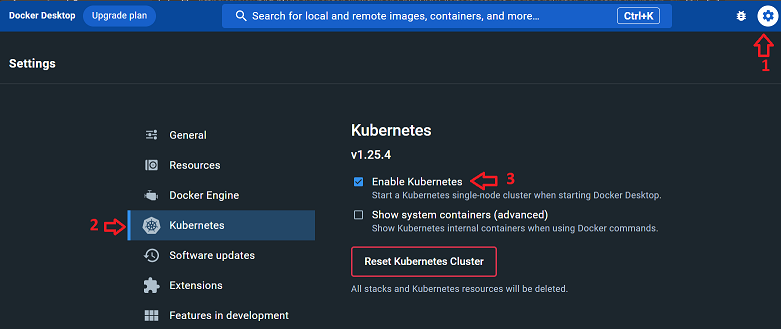
Optionally you can also install the following tools on the local machine:
Using Docker as the container engine
- Download the docker compose file for the BRP API Personen mock
- Open a command prompt window in the folder containing the docker-compose-mock.yml file
- Start the BRP API Personen mock using the following statement:
docker compose -f docker-compose-mock.yml up -dThe BRP API Personen mock can now be reached at the URL: http://localhost:5010/haalcentraal/api/brp/personen
- Validate that the BRP API Personen mock is running using the following curl statement:
curl --location --request POST 'http://localhost:5010/haalcentraal/api/brp/personen' \
--header 'Content-Type: application/json' \
--data-raw '{
    "type": "RaadpleegMetBurgerservicenummer",
    "burgerservicenummer": ["999993653"],
    "fields": ["burgerservicenummer"]
}'- To stop the BRP API Personen mock container, run the following statement:
docker compose -f docker-compose-mock.yml downUsing Kubernetes as the container engine
- Download the Personen Kubernetes configuration files
- Open a command prompt window in the folder containing the Kubernetes manifest files
- Start the BRP API Personen mock using the following statement:
kubectl apply -f .k8s/personenmock-deployment.yaml \
              -f .k8s/personenmock-service.yaml
The BRP API Personen mock can now be reached at the URL: http://localhost:5010/haalcentraal/api/brp/personen
- Validate that the BRP API Personen mock is running using the following curl statement:
curl --location --request POST 'http://localhost:5010/haalcentraal/api/brp/personen' \
--header 'Content-Type: application/json' \
--data-raw '{
    "type": "RaadpleegMetBurgerservicenummer",
    "burgerservicenummer": ["999993653"],
    "fields": ["burgerservicenummer"]
}'- To stop the BRP API Personen mock container, run the following statement:
kubectl delete -f .k8s/personenmock-deployment.yaml \
               -f .k8s/personenmock-service.yaml